
Secure Development and AI Isolation with Dev Containers

Modern software development often means executing code you did not write yourself. Every time npm run dev is executed, third-party code is running. This poses a significant security risk when that code runs with elevated user privileges on the host system. The concrete dangers include:
- Backdoors: Malicious code that installs a hidden entry point in the system, allowing attackers to gain undetected access at any time.
- Data loss: Files on the host system can be deleted, encrypted, or tampered with.
- Data exfiltration: Sensitive data such as SSH keys, credentials, or personal files can be silently sent to attackers.
AI-agents introduce new risks. While powerful, these agents should not have unrestricted access to your personal files, SSH keys, or other assets in the host environment. On top of the risks mentioned above, AI agents introduce another one:
- Prompt Injection: Hidden instructions on websites or in code repositories can trick the AI agent into performing unintended actions, such as exfiltrating data or injecting harmful code.
- Unexpected errors: AI agents can simply make mistakes, e.g. overwriting or deleting files.
The Strategy: Containment
At Tanner Lab, we use Dev Containers to solve both problems. By moving development into Docker containers, we achieve a standardized, reproducible, and isolated environment.
We have adopted a dual-container strategy for our repositories:
- Human Development (
dev--{repository-name}): For isolated code execution and development. - AI Sandbox (
ai--{repository-name}): For collaborating with AI agents.
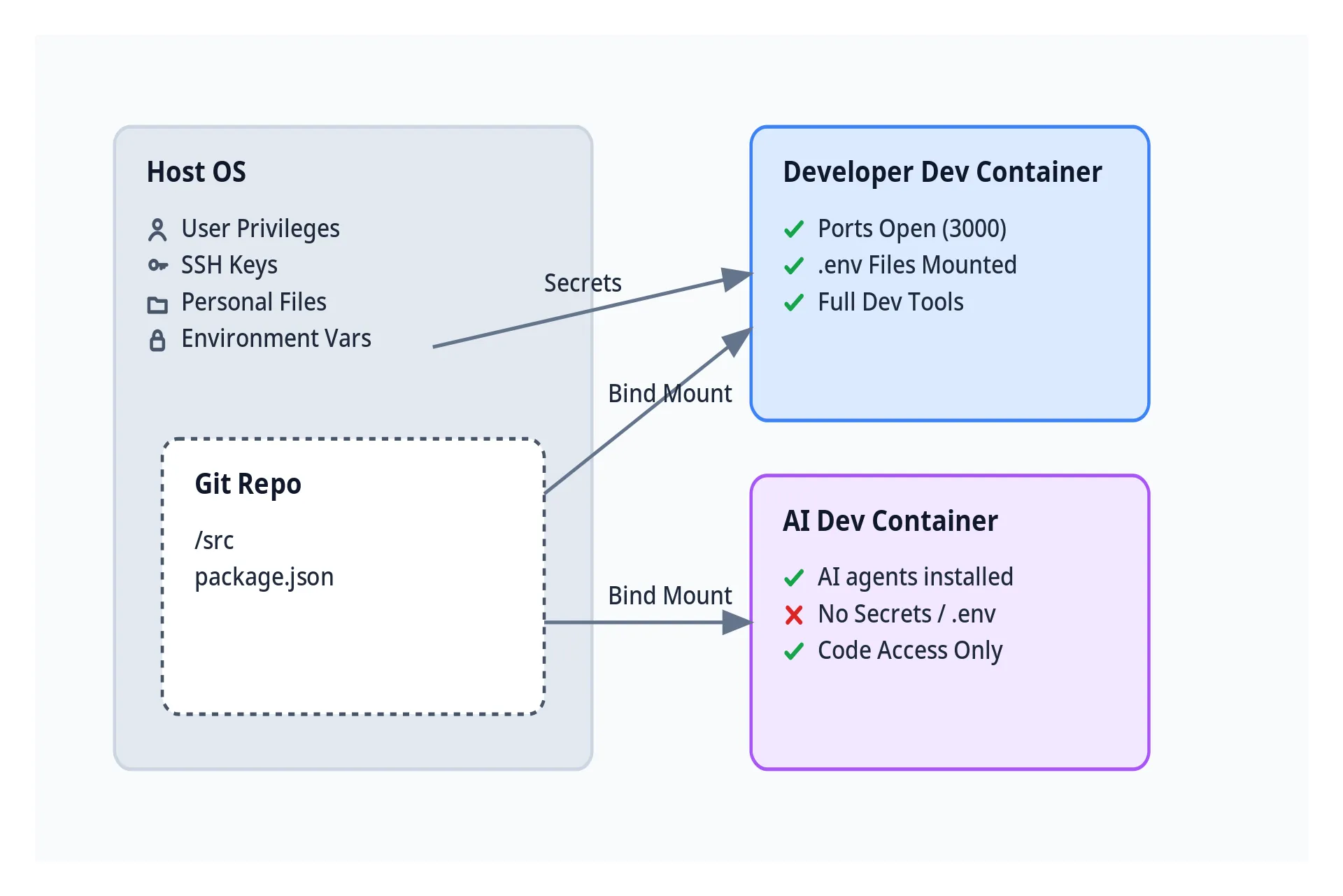
1. Secure Human Development
The development container is designed for the human developer. It needs access to environment variables (secrets) and needs to expose ports to view the application. However, by running inside a container, we ensure that executing unknown code (e.g. node_modules) does not compromise the host system.
dev/devcontainer.json:
{
  "name": "dev--my-app",
  "runArgs": [
    "--env-file", "${env:HOME}/code-envs/my-app.env",
    "-p", "3000:3000"
  ],
  "workspaceMount": "source=${localWorkspaceFolder},target=/workspace,type=bind"
}
2. AI Agent Isolation
AI agents often need to read the codebase to understand context, but they do not need access to runtime credentials. We run them in a separate container.
This container has no project-specific environment variables. It creates a safe sandbox where an agent can operate on the code without the risk of accidentally leaking credentials or accessing other parts of the system.
ai/devcontainer.json:
{
  "name": "ai--my-app",
  // No env-file, no port forwarding
  "workspaceMount": "source=${localWorkspaceFolder},target=/workspace,type=bind",
  "customizations": {
    "vscode": {
      "extensions": ["anthropic.claude-code", "openai.chatgpt", "Google.geminicodeassist"]
    }
  }
}
Reference Implementation
We published a reference implementation with Vike, React, and Tailwind to make the approach easier to understand.
It includes the complete folder structure and configuration, which can be copied into other projects.
.devcontainer/
├── ai/
│   ├── Dockerfile
│   └── devcontainer.json
└── dev/
    ├── Dockerfile
    └── devcontainer.json
Check out the repository on GitHub: tannerlab/working-with-devcontainers